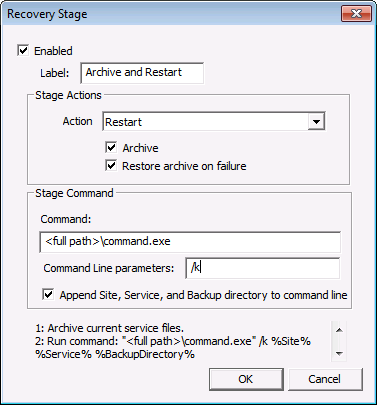
For each recovery stage you add, you must define the properties for that stage. This includes the name of the stage, the recovery action, and optionally a stage user command.
| Property | Description | ||||||||||||||
|---|---|---|---|---|---|---|---|---|---|---|---|---|---|---|---|
|
Enabled |
Click to enable the recovery stage. |
||||||||||||||
|
Label |
The name of the stage, displayed on the Recovery Stages list. This is not required; however, it aids in organization and stage ordering. This is a free-form text field (19 chars max). |
||||||||||||||
|
Stage Actions |
See Automatic Service Recovery for a full description of each action.
|
||||||||||||||
|
Enables copying service files to a "recovery" folder before attempting to restart the service. Every time this option runs a new recovery folder is created and the files are written to that folder. The name of the recovery folder is "Recovery\YYYYMMDDhhmmss," where "YYYYMMDDhhmmss" represents the timestamp when the folder was created. See Timestamps in the Data section for more information. Note: The RSM will no longer use an archive once the recovery stage that created the archive is complete regardless of success or failure.
|
|||||||||||||||
|
Enables restoring the archive files from the "recovery" folder if the restart of the service fails. The Archive option must be enabled for this option to be enabled. This option is most appropriately used in combination with the Restore backup and restart action. In the event the backup files do not allow the service to restart, the archived files will be restored to the service folder. The stage using Restore archive on failure must be followed by a restart stage in order to start the service from these archived files. Otherwise the files will be moved back into the service folder and the service will remain stopped. |
|||||||||||||||
|
You can specify a stage user command to be executed before performing the Restart action for the selected recovery stage. |
|||||||||||||||
|
Command |
Type a user command (such as an .exe or .bat). Note: Specify the full path to the .exe or .bat file. |
||||||||||||||
|
Command Line parameters |
Type any required command-line parameters for the user command. |
||||||||||||||
|
Append Site, Service, and Backup directory to command line |
Click to append text tokens for %Site%, %Service%, and %BackupDirectory% to the command line. |
||||||||||||||
|
Recovery stage sequence |
A scrollable area at the bottom of the dialog box will list the sequence of configured steps that will occur for the recovery stage. |

|
|
|

